Site
Roof or land, constraints and inputs.
Start with a site and a documented design basis.
ENGINEERING REVIEW REQUIRED ⓘ
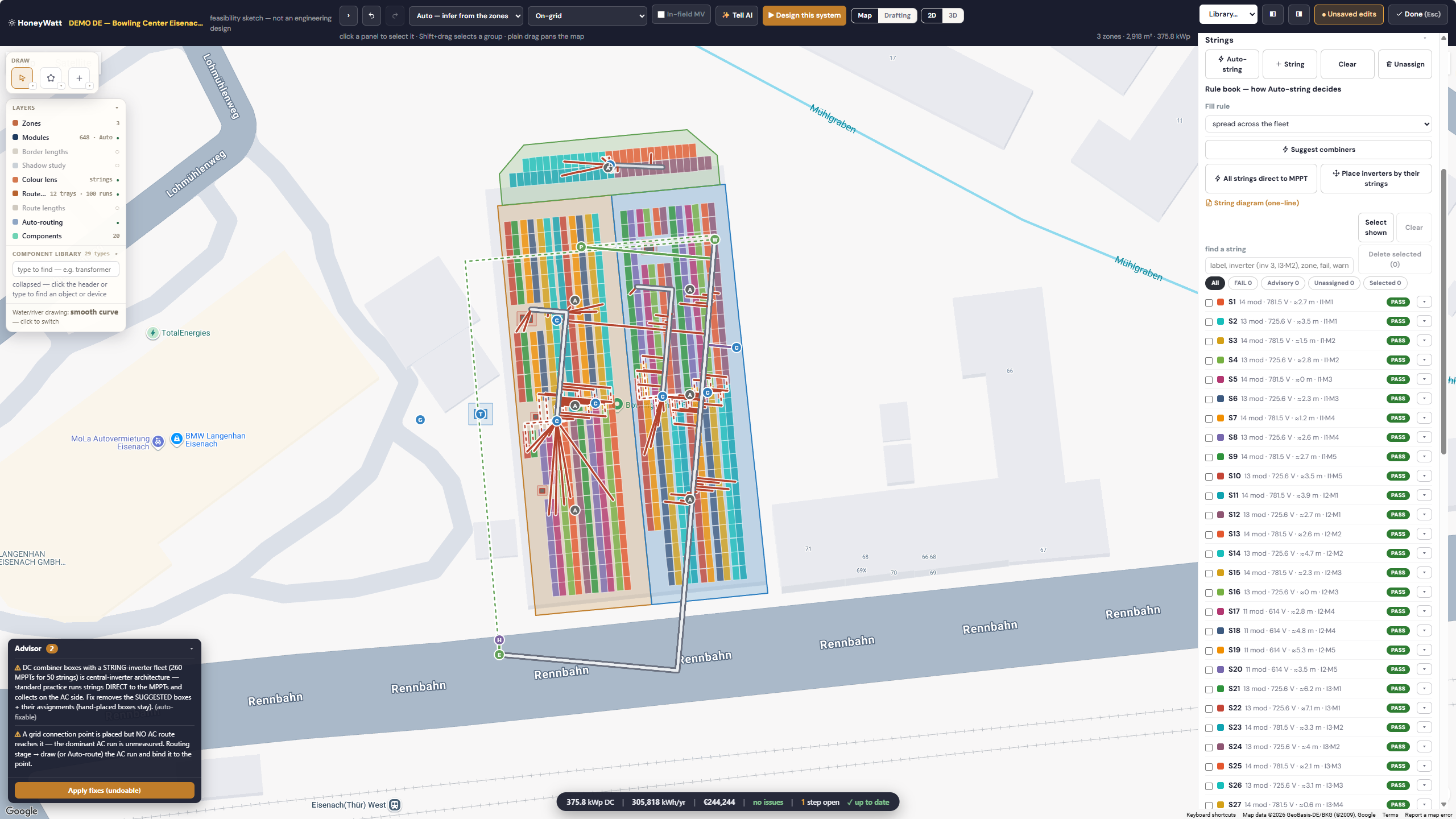
HoneyWatt · demo feasibility layout. Engineering review is required before release.
 HoneyBee
HoneyWatt brings solar, battery and associated electrical engineering into one project workspace for solar EPCs, engineers and renewable-energy developers.
HoneyWatt · demo feasibility layout. Engineering review is required before release.
Roof or land, constraints and inputs.
Start with a site and a documented design basis.
HoneyWatt · demo feasibility layout. Engineering review is required before release.
Module arrangement and site constraints.
Review the placement and usable area in the engineering canvas.
HoneyWatt · demo feasibility layout. Engineering review is required before release.
Stringing and connections.
Inspect the single-line representation and electrical assumptions.
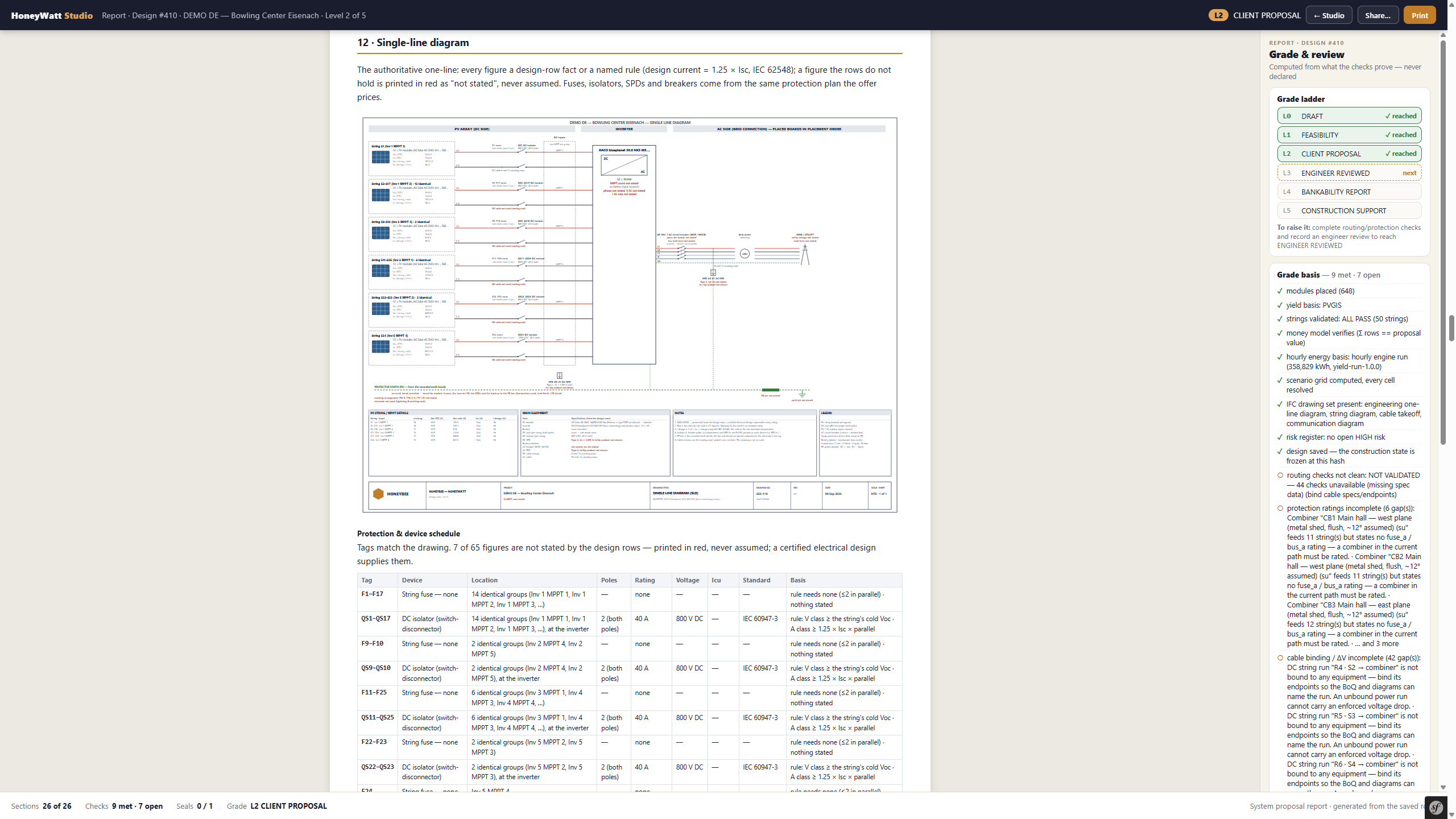
HoneyWatt · demo single-line diagram. Shown at client-proposal stage; qualified engineering review remains required.
Battery sizing and operating assumptions.
Review storage requirements alongside the modelled system. This capture is a yield view, not a battery-sizing screen.
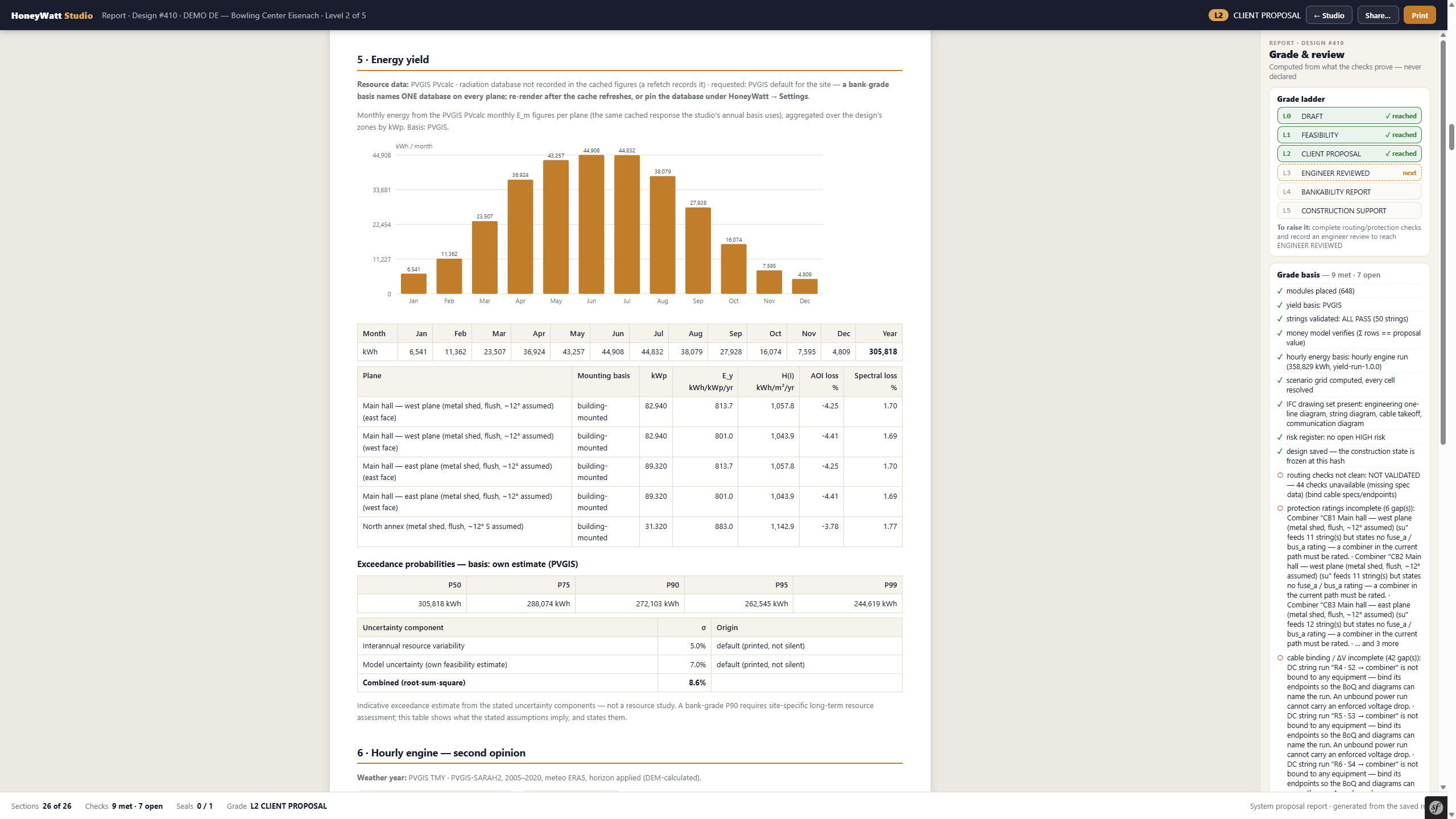
HoneyWatt · demo yield report with assumptions and open checks. Modelled results, not a savings guarantee.
Modelled yield and system behavior.
Inspect simulated output and its underlying assumptions.
HoneyWatt · demo yield report with assumptions and open checks. Modelled results, not a savings guarantee.
Costs and financial assumptions.
Review yield alongside the project economics; this capture does not establish a financial return.
HoneyWatt · demo yield report with assumptions and open checks. Modelled results, not a savings guarantee.
Drawings, BoQ and qualified engineer review.
Review deliverables before release. This capture shows the SLD, not every available output.
HoneyWatt · demo single-line diagram. Shown at client-proposal stage; qualified engineering review remains required.
HoneyWatt · demo feasibility layout. Engineering review is required before release.
Start with a site and a documented design basis.
HoneyWatt · demo feasibility layout. Engineering review is required before release.
Review the placement and usable area in the engineering canvas.
HoneyWatt · demo single-line diagram. Shown at client-proposal stage; qualified engineering review remains required.
Inspect the single-line representation and electrical assumptions.
HoneyWatt · demo yield report with assumptions and open checks. Modelled results, not a savings guarantee.
Review storage requirements alongside the modelled system. This capture is a yield view, not a battery-sizing screen.
HoneyWatt · demo yield report with assumptions and open checks. Modelled results, not a savings guarantee.
Inspect simulated output and its underlying assumptions.
HoneyWatt · demo yield report with assumptions and open checks. Modelled results, not a savings guarantee.
Review yield alongside the project economics; this capture does not establish a financial return.
HoneyWatt · demo single-line diagram. Shown at client-proposal stage; qualified engineering review remains required.
Review deliverables before release. This capture shows the SLD, not every available output.
Approved captures illustrate selected views. A walkthrough covers the detailed workflow.
A workspace for the people responsible for the design.
Move from the site arrangement into stringing, cable routes and electrical connections.
Review battery sizing and the role of storage within the proposed electrical system.
Review assumptions, engineering checks and deliverables before they become a commercial commitment.
Carry a reviewed design into drawings, a bill of quantities and proposal preparation. Confirm the supported outputs for your project scope.
Record inputs, assumptions and site constraints.
Check electrical selections, yield assumptions and the intended operating conditions.
Confirm output content and suitability for its intended use.
HoneyWatt supports engineering work. It does not replace qualified engineer review, statutory requirements or specialist studies. Sign in with your existing HoneyBee account to open the Studio.
Bring a workflow or project. Agree the scope before the rollout.